TL;DR: Going into Ignite, I wanted to pull together a quick field guide. Microsoft has done a lot of reorganising and renaming around Microsoft Copilot, Microsoft Teams and the rest of Microsoft 365 over the course of 2026, and this baselines where everything stands before the event. Every entry links to its source, and where Microsoft's own sources disagree I've included both, because since when was naming consistent 😅. Let's see where we are when we come out the other side.
P.S. Try my Ignite Bingo game for the keynote and beyond.
Sections: Microsoft Copilot and agents (labels, renames, terms, billing, Claude, Work IQ) · Building agents and apps · Teams and Microsoft 365 · Dates that need action
Microsoft Copilot and agents
Basic and Premium: the licence labels
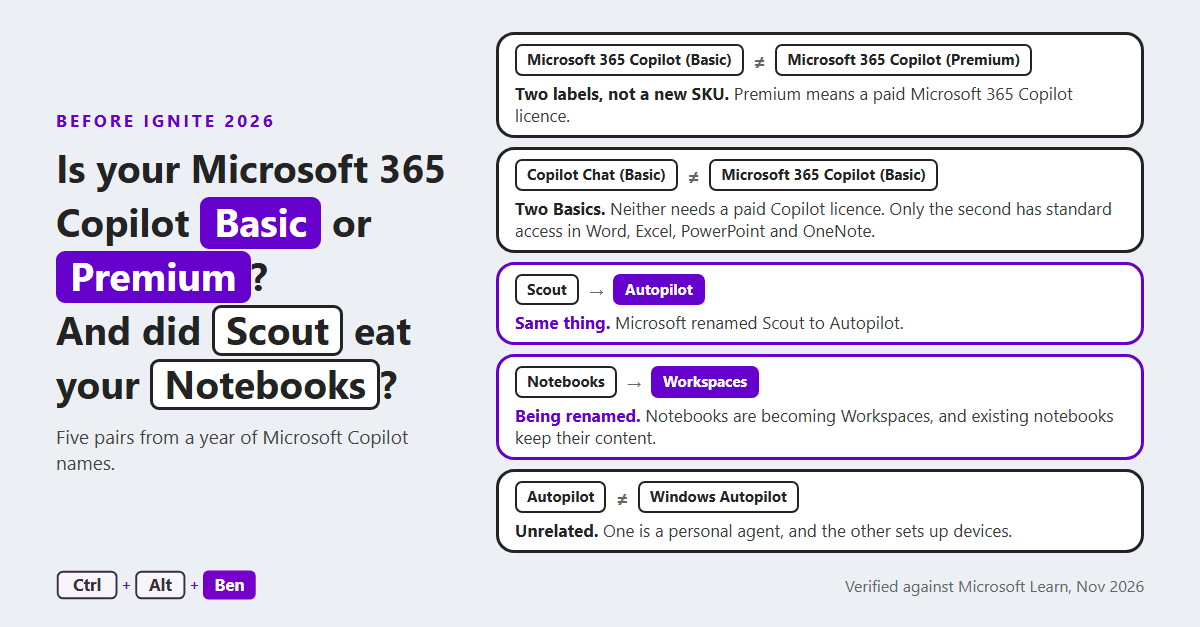
Basic and Premium are labels shown in the apps, not new SKUs. Premium means the user has a paid Microsoft 365 Copilot licence, and Basic means they don't. (Learn)
| Label | Licence | What the user gets |
|---|---|---|
| "Copilot Chat (Basic)" | No paid Copilot licence | Chat only. No Copilot in Word, Excel, PowerPoint and OneNote |
| "Microsoft 365 Copilot (Basic)" | No paid Copilot licence | Chat, plus "standard access" to Copilot in those apps, which depends on service capacity |
| "Microsoft 365 Copilot (Premium)" | The paid Microsoft 365 Copilot licence | Priority access in those apps, grounded in web data and work data |
What was renamed
| Was | Now | When | Source |
|---|---|---|---|
| The Microsoft 365 Copilot app | Microsoft Copilot | No date given | Learn |
| Microsoft 365 Copilot Chat | Microsoft Copilot Chat | No date given | Learn |
| Existing Microsoft 365 Copilot subscriptions | "Microsoft 365 Copilot (add-on)" and "Microsoft 365 Copilot Business (add-on)" | 16 October 2026 | MC1508148 |
| Copilot Notebooks | Copilot Workspaces | Message Center: Frontier first, standard release by January 2027. Support article: from late October 2026 | MC1535647, Support |
| Scout | Autopilot | Announced 25 September 2026. Rollout date pending | MC1479277 |
| The "Agents", "Agents & Skills" and "Customize" buttons | "Plugins" | Late October to late November 2026 | MC1484008 |
| The work and web switches in Chat | The "Work IQ" control | From June 2026 | MC1325422 |
| The GitHub Copilot harness in Copilot Studio | The Microsoft Copilot harness | After 3 August 2026 | Learn |
| Knowledge Agent in SharePoint | "AI in SharePoint", then Copilot in SharePoint | March 2026 for the first rename | MC1242587, Learn |
| Project Manager agent in Planner | Planner Agent | Mid-March to end of May 2026 | MC1250279 |
One rename didn't happen. Microsoft said the Surveys agent would become Forms agent, and withdrew the rename on 3 June 2026.
Terms in the app
- Autopilot is an always-on personal agent in the Microsoft Copilot app. It is unrelated to Windows Autopilot, which sets up devices.
- "Home", "Code" and "Autopilot" are the three work areas of the app. "Home" holds Chat and Cowork. Cowork and Code need a Microsoft 365 Copilot licence and a usage-based billing policy. (my September post)
- Copilot Projects is separate from Workspaces: Projects is for a user's own work and Workspaces is for group work. (Learn)
- A plugin is a package of skills, connectors and MCP servers. Admins manage plugins in the Microsoft 365 admin centre under Agents > Tools. (Learn)
- A skill is a set of reusable instructions in a SKILL.md file. The packaging rules differ between Cowork, Copilot Chat and Copilot Studio. (Learn)
- Frontier is the preview programme, set by "Copilot Frontier" and off by default. "Frontier models" are the newest models, billed in Copilot Credits. (Learn)
- From 1 December 2026, Microsoft sells Microsoft 365 Copilot without a qualifying Microsoft 365 base subscription. The "(add-on)" subscriptions stop being sold new, and existing ones can still be renewed. (MC1508148)
Naming quirks and source notes (10)
- The licence has two names on Learn: "Microsoft 365 Copilot" on the overview page, and "Microsoft Copilot license" on the licence options page.
- Learn does not use the "(add-on)" names yet.
- Learn gives no date for the second SharePoint rename, from "AI in SharePoint" to Copilot in SharePoint.
- Learn has no Autopilot pages and still carries the Microsoft Scout (Frontier) pages.
- The Autopilot post calls the "Plugins" entry point "Agents & Plugins".
- The Message Center says a plugin can also bundle agents. Learn's definition doesn't list them.
- Learn's Power Platform admin centre steps still show the harness as "GitHub Copilot".
- "Skill" has older meanings in Copilot Studio (Bot Framework skills, "Topic skills"), and PowerPoint has its own custom skills.
- Directions on Microsoft reported that the Basic and Premium labels took effect on 15 April 2026.
- In both Basic positions Chat uses web data. A user brings in work content by uploading it, by using open content in Outlook and Teams, or through a pay-as-you-go agent.
Licensing and billing
- User subscription licence (USL): the per-user Microsoft 365 Copilot licence. (Learn)
- Usage-based billing (UBB): charged by use, on top of a USL, once a spending policy exists. It covers Cowork, Code, Autopilot and the newest models.
- Spending policy: what switches UBB on. It's created in the Microsoft 365 admin centre under Copilot > Cost Management. (Learn)
- Copilot Credits: the unit UBB is charged in. The Work IQ API, the Microsoft Copilot harness in Copilot Studio and AI Builder also draw on them.
- "Auto": the default mode in Microsoft Copilot. GPT 5.6 and Sonnet are included in the USL with fair use, and Opus with limits.
- Fair use limits: applied to Copilot Chat users without a licence. Admins can't view or adjust them, and Microsoft doesn't publish the numbers. (MC1536158)
- From mid-November 2026: new tenants buying Microsoft 365 Copilot Business direct from Microsoft get usage-based billing by default, with a limit of 4,000 Copilot Credits per user per month. Existing tenants aren't included, and CSP follows in early 2027. (MC1476200)
- By 20 November 2026: Copilot Studio spending can be managed from Cost Management in the Microsoft 365 admin centre. An admin opts in by creating a spending policy there. (MC1530368)
- At the end of January 2027: Cowork, Code and Autopilot become visible to every licensed user. This doesn't start billing. Users without a spending policy see a request-access or learn-more screen. (MC1546354)
Naming quirks and source notes (8)
- Learn calls the same object a "billing policy" on one page and a "spending policy" on another.
- First-time setup needs a Global Administrator or Billing Administrator. An AI Administrator can edit spending policies but can't create them.
- Learn lists a control marked "coming soon", with no date: a user who reaches a USL limit can continue on Copilot Credits or switch to "Auto".
- Learn calls one setting both "Access requests to usage-based billing experiences" and "Access to usage-based billing experiences". It defaults to "All users".
- The Copilot Business change excludes eleven markets at first. The UK isn't one of them. Microsoft changed the dates on 9 November, which supersedes my September post.
- The Work IQ API has been generally available since 16 June 2026 and has no separate SKU. Usage through Microsoft's own apps isn't billed.
- The Microsoft Copilot harness has been billed in Copilot Credits since 3 August 2026.
- From 1 November 2026, new and renewed licences no longer include seeded AI Builder credits. Existing credits run to the end of the contract term.
Models and Claude
- Today: Claude models are on by default in most commercial tenants, and off by default in the EU, EFTA and the UK. (Learn)
- On 9 December 2026: UK tenants and eligible EU and EFTA tenants with no selection, or with the apps-only option, move to "All users". Selections of "No users" and "Specific users and groups" are kept. (UK, EU and EFTA)
- Data boundary: for eligible EU and EFTA tenants, Claude processing moves into the EU Data Boundary from early December 2026. UK tenants aren't in scope.
- The control: "AI providers operating as Microsoft subprocessors", in the Microsoft 365 admin centre under Copilot > Settings > View all, then Anthropic. It needs an AI Administrator or Global Administrator.
Source conflict: the Learn page still shows the old defaults for the UK, EU and EFTA, and still says Claude is outside the EU Data Boundary.
Work IQ: the data behind Copilot
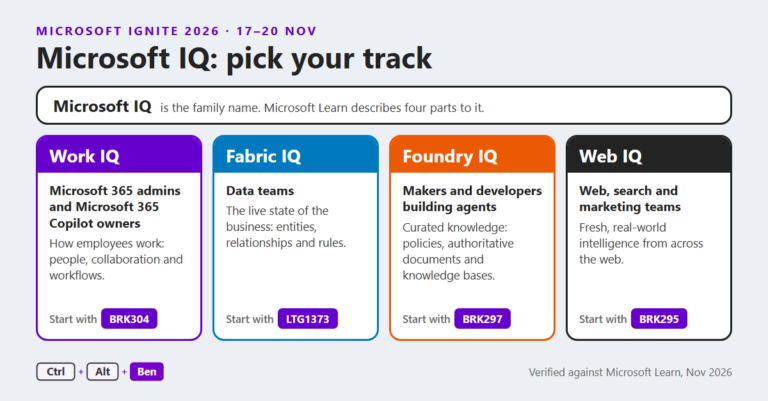
Work IQ is the layer that gives Copilot and agents access to work data. It is one of four in the Microsoft IQ family, with Fabric IQ, Foundry IQ and Web IQ. It shows up in four places:
- The "Work IQ" control in Chat. It decides whether Chat uses work data. With it off, Copilot answers without Microsoft 365 work data. (Support)
- The Work IQ API. It gives custom agents access to Microsoft 365 data through A2A, MCP and REST, billed in Copilot Credits.
- Business Applications in Work IQ (preview). It brings Power Apps and Dynamics 365 data into Copilot, and it's on by default for new environments since 30 September 2026. EU, EFTA, government and nonproduction environments are excluded. (Learn)
- Copilot memory through Work IQ MCP. From early December 2026, an authorised agent can read the signed-in user's Copilot memory. It's read-only, and the policy is enabled by default under Agents > Tools > Registry > Work IQ MCP > Policies. (MC1539004)
Source conflict: Learn says Business Applications in Work IQ is turned on for existing environments from November 2026. The Message Center post said existing environments were not enabled.
Naming quirks and source notes (4)
- The Message Center calls the "Work IQ" control a toggle, and Support calls it a button.
- The Foundry IQ and Fabric pages still describe three members of the family, without Web IQ.
- Learn doesn't document the Work IQ MCP memory path yet.
- Three settings control Business Applications in Work IQ: one for the tenant, one for the environment and one on each model-driven app. Admin controls reach public preview by 17 November 2026.
Building agents and apps
- Agent Builder replaces .agent files. From mid-November 2026, "Create an agent" in SharePoint and OneDrive opens Microsoft Copilot Agent Builder. Existing .agent agents work until the end of March 2027 according to Learn, and until early to mid-April according to the Message Center. There's no automatic upgrade.
- Copilot Studio has three harnesses. A harness is the runtime between the agent and the model. The Microsoft Copilot harness is for multi-step work and bills from the moment building starts. The standard harness is for rule-based agents and bills after publishing. The Customer Conversation harness is for customer service and is in preview. (Learn)
- App Builder and vibe.powerapps.com retire. Editing ends on 30 November 2026, and apps can be migrated or downloaded until 31 December. Apps are now built in Cowork (Frontier) and Copilot Studio (public preview). (Learn)
- Copilot in the Power Automate designer retires on 30 November 2026. Existing flows aren't changed. (MC1540258)
- Copilot Tuning is paused in Agent Builder while it moves to Copilot Studio, with general availability from December 2026. Existing tuned agents keep working. (MC1454393)
- Power Platform prompts lose their Anthropic and Grok models on 2 December 2026. Prompts in Power Apps, Power Automate and Copilot Studio move to GPT models in the same pricing tier. This is separate from the Claude setting. (MC1536101)
- Microsoft Foundry: the Microsoft Copilot harness is also available in Foundry Agent Service, in preview, and Foundry agents can be published to Microsoft Copilot and Teams.
Naming quirks and source notes (3)
- The Message Center gives 30 November as the App Builder retirement date. The December migration window is on Learn only.
- Learn's Copilot Tuning pages don't mention the pause. The Optimization template is retired.
- The Microsoft Copilot harness became generally available on 3 August 2026 as the GitHub Copilot harness. Learn records the rename in one place and gives no date.
Microsoft Teams and the rest of Microsoft 365
| Was | Now | When | Source |
|---|---|---|---|
| Microsoft Teams Shared Devices licence | Microsoft Teams Shared Space licence | April 2026 | Learn |
| Windows 365 Frontline | Windows 365 Flex | Week of 4 May 2026 | Learn |
| "Live chat" in Teams | "Customer Connect" | Mid to end of May 2026 | MC1287369 |
| The Viva Connections app in Teams | The SharePoint app in Teams | June 2026 | Learn |
| Microsoft 365 Roadmap | AI at Work Roadmap | 25 August 2026 | MC1461528 |
| "GitHub Notifications" in Teams | "GitHub" | 16 November 2026 | MC1515929 |
- The GitHub rename involves three names. "GitHub Notifications" becomes "GitHub" after a manual update. "GitHub (deprecated)" is the app that used to be called "GitHub". The new "GitHub" app includes the GitHub Copilot coding agent. GitHub Copilot is GitHub's product and isn't part of Microsoft Copilot. (my post of 11 November)
Naming quirks and source notes (3)
- "Customer Connect" is in the Message Center only. Learn still calls it Microsoft Teams Live chat and says it's unsupported from 5 October 2026.
- Tenants with a customised Viva Connections app name and logo see no change.
- Windows 365 Flex modes are named Flex shared and Flex dedicated. SKU display names and Microsoft Graph values followed in early October 2026. (MC1465760)
Dates that need action
These five need an admin to check or decide something. The other retirement dates are for awareness, and the full list is in the expander under them.
- Since 15 November 2026: Dataverse for Teams. New environments can't be created. Environments that aren't upgraded to Dataverse are suspended on 15 September 2027.
- 16 November 2026: the GitHub apps in Teams. "GitHub (deprecated)" is deprecated. "GitHub Notifications" becomes "GitHub" only after a manual update.
- 30 November and 31 December 2026: App Builder. Editing ends on 30 November. Apps can be migrated or downloaded until 31 December.
- 9 December 2026: Claude models in the UK, EU and EFTA. Tenants with no selection move to "All users". Select "No users" or "Specific users and groups" first to keep Claude off or limited.
- 31 March 2027: .agent files in SharePoint and OneDrive. There's no automatic upgrade.
See the full list: all 14 retirement and end-of-support dates
| What | Date | Source |
|---|---|---|
| Microsoft Teams Live chat | Not supported from 5 October 2026 | Learn |
| Seeded AI Builder credits on new and renewed licences | 1 November 2026 | MC1526652 |
| The "Critique" and "Council" previews in Researcher | Mid-November 2026 | MC1515927 |
| Creating new Dataverse for Teams environments | 15 November 2026 | MC1515294 |
| The "GitHub (deprecated)" app in Teams | 16 November 2026 | MC1515929 |
| Editing App Builder apps, and vibe.powerapps.com | 30 November 2026 | MC1505609 |
| Copilot in the designer for cloud flows and agent flows | 30 November 2026 | Learn |
| New purchases of the "(add-on)" Copilot subscriptions | 1 December 2026 | MC1508148 |
| Anthropic and Grok models in Power Platform prompts | 2 December 2026 | MC1536101 |
| The apps-only option for Claude models | 9 December 2026 | MC1546435 |
| Several Researcher tabs and controls | 30 December 2026 | MC1476269 |
| Migrating or downloading App Builder apps | 31 December 2026 | Learn |
| Existing .agent agents in SharePoint and OneDrive | End of March 2027 (Learn), or early to mid-April (Message Center) | Learn, MC1511052 |
| Dataverse for Teams environments that aren't upgraded | Suspended 15 September 2027, decommissioned 30 October 2027 | Learn |
Researcher and Analyst are not retired. They're no longer pinned by default in the app, and users open them from "Plugins". An AI Administrator can pin agents for users.
Where each setting lives (7)
| Setting | Where it is | Default |
|---|---|---|
| "AI providers operating as Microsoft subprocessors" | Microsoft 365 admin centre, Copilot > Settings > View all | On for most commercial tenants. "No users" in the UK, EU and EFTA until 9 December 2026 |
| "Access requests to usage-based billing experiences" | Microsoft 365 admin centre, Copilot > Settings | "All users" |
| Spending policy for usage-based billing | Microsoft 365 admin centre, Copilot > Cost Management | None until an admin creates one, except for new Copilot Business tenants buying direct |
| "Copilot Frontier" | Microsoft 365 admin centre, Copilot > Settings > View all | "No access" |
| Work IQ MCP memory read policy | Microsoft 365 admin centre, Agents > Tools > Registry > Work IQ MCP > Policies | Enabled |
| "Business Applications data in Work IQ available to Copilot" | Microsoft 365 admin centre, Copilot > Settings > View all | "All users" |
| "Work IQ" environment setting | Power Platform admin centre, the environment's Settings > Product > Features | On for new environments |
I'll publish a debrief after Ignite.
Ta, Ben.