32bit web app inside 64bit website – IIS 7.0

by Ben Lee | Jun 9, 2008 | Fixes | 0 comments

Recently when deploying Microsoft Dynamics CRM 4.0 we had the need to “rollup” all the customisations and host them underneath the main CRM website so that it could be successfully published externally. One issue that we had with this is that the customisations needed were 32bit aspx pages and so needed to be run with a 32 bit application pool whereas the server and therefore the main website was 64bit including all the CRM functions.

After hunting around on the net for a bit and some trial and error I worked out what we needed to do to get it working correctly. I will go more in-depth into the CRM specifics in the next post but I thought in this post I’d just cover the basics of setting up an nested 32bit web application inside a 64bit site…

Creating 32bit application pool

  • Open IIS manager
  • right click on “Application Pools” and pick “Add Application Pool”
  • give it a name & pick your version of .net
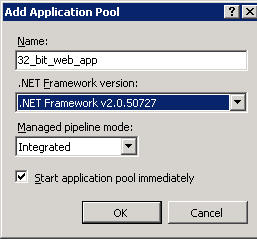
Application pool creation screen

  • After creating your new web app, right click on it and open “Advanced Settings”
  • Near the top of the list is a setting “Enable 32-Bit Applications”, set that to True
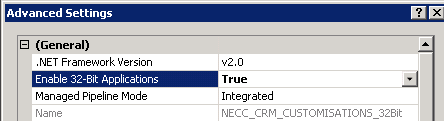
Enable 32-bit applications

  • From this screen you can also change the Identity (user account it runs under) etc…

Nesting Application Pools

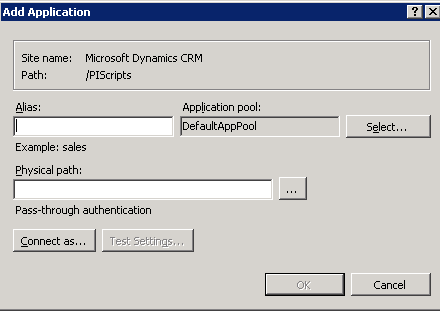
  • Now you can expand your website and right click at the folder (or site) level depending on where you want your application to sit.
  • Select “Add Application” (or if you want to convert a folder to an application pick “Convert to Application”)
image

  • Enter the Alias (path you want it to appear under) and pick the web application you created in the earlier steps as well as the path to the folder on disk.

Potential issues

Settings inheritance – nested web applications will inherit any custom settings from their parents. This will include any 64bit modules (as in the case of CRM) or Handler mappings from the parent that might not apply to the new application that you have created. I had a few of these issues when running the 32bit CRM customisations under Dynamics 4.0 64bit (see next post).

You can remove any unwanted modules by either editing the web.config file in your new directory or via the IIS admin console:
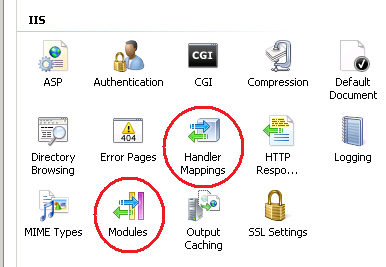
image

[tags]server 2008, iis 7.0, CRM 4.0[/tags]

ICYMI Lite, every Monday.

Tagged
Ben Lee

Ben Lee

Ben Lee is a Microsoft MVP and MCT who has been wrangling Microsoft 365 for longer than he would like to admit. By day he is a Head Nerd at N-able. Everything here is his own opinion.

Related

ICYMI Lite: 2–8 November 2026

ICYMI Lite: 2–8 November 2026

🧻 ICYMI Lite: my first agent, let them eat cake 𝗧𝗟;𝗗𝗥: Last week Microsoft called time on SharePoint's .agent files and made Agent Builder the front door for a first agent, started telling unlicensed Copilot Chat users when they've hit a limit (without saying what the...

ICYMI Lite: 26 October–1 November 2026

ICYMI Lite: 26 October–1 November 2026

🧻 ICYMI Lite: one harness, hold on to your hats 𝗧𝗟;𝗗𝗥: Last week Microsoft gave its agent harness one name, took it to Foundry and put a Decision API in front of Work IQ, started winding down Azure Communication Services, and offered 60,000 people the door in the same...

Agent Builder or Copilot Studio? Building agents in Microsoft 365

Agent Builder or Copilot Studio? Building agents in Microsoft 365

Agent Builder or Copilot Studio: where should you actually build an agent in Microsoft 365, and do you even need an agent, or was it a flow all along? In episode fifteen of 365 Explained, Ben and Zach finally deliver the agents episode we promised back in the Power Automate one, from building an agent in Agent Builder to a tour of Copilot Studio and its harnesses.

The Microsoft Authenticator AuthMask flaw: what to check

An interesting write-up this last week on a flaw in Microsoft's Authenticator app. Don't worry (well, not a lot), a fix was pushed in July, and thanks to responsible disclosure we're only now getting the full detail. Enclave's AuthMask research showed that a malicious...

ICYMI Lite: 19–25 October 2026

ICYMI Lite: 19–25 October 2026

🧻 ICYMI Lite: defaults, smoke alarms and PHP 𝗧𝗟;𝗗𝗥: Last week GitHub started switching on Copilot defaults for admins who never picked, Teams put itself into Efficiency Mode on 8 GB laptops, OpenAI's own coding agents turned off the monitoring that watches them and...

Windows Update certificates are rotating in 2027

PSA: if you use Windows Update to patch your machines directly, be aware that Microsoft is rotating out the certificates behind it on 17 May and 19 June 2027. To keep connecting after those dates, your devices need to have installed the September 2025 security update...

ICYMI Lite: 12–18 October 2026

ICYMI Lite: 12–18 October 2026

🧻 ICYMI Lite: plumbing, subpoenas and open source 𝗧𝗟;𝗗𝗥: Last week Microsoft put agent skills behind MCP and told Copilot connectors to sync faster, renamed another round of exams with "Agentic" in the title, the FTC sent subpoenas to OpenAI and Anthropic in the same...

Robots in the therapist's office: IT pro troubleshooting in the age of AI

IT pro troubleshooting in the age of AI

Once upon a time, the IT pro troubleshooting toolkit was things like Regedit, command-line tooling, plumbing the depths of .ini files, watching process traces and capturing network logs. These days, with AI, it feels a bit more like you need to have a good grounding...

ICYMI Lite: 5–11 October 2026

ICYMI Lite: 5–11 October 2026

🧻 ICYMI Lite: Windows goes local, agents go off-piste 𝗧𝗟;𝗗𝗥: Last week Microsoft built Windows around models that run on the laptop and put an Nvidia price tag on the hardware to match, Anthropic's own agents filed a fake murder tip and got their internet taken away...